How to Keep a Voice Journal on iPhone

A voice journal is a diary you speak instead of write: a few minutes of talking about your day, a feeling or a decision, saved so you can come back to it. On iPhone, the simplest setup is a recording app that turns each entry into text, so you can skim and search old entries, and that keeps everything on the phone, so your diary stays yours.
Here's how to start, what to say when your mind goes blank, and how to keep a spoken diary private.
Why speak your journal instead of writing it
Talking is faster than typing, and you tend to edit yourself less when you speak. You don't face a blank page, you can do it on a walk or with your hands busy, and your voice holds things text doesn't, like how tired or excited you were.
There are trade-offs. You need somewhere you're comfortable talking out loud. Spoken entries ramble. And audio is slow to review: nobody wants to listen to a month of entries to find the one about a job offer. That last problem is the reason to transcribe. With text next to each recording, you can skim an entry in seconds and search all of them at once.
How to start a voice journal
- Pick one moment a day and attach it to something you already do. After you brush your teeth, on the walk home, or in the car before you go inside. A fixed cue beats willpower.
- Make starting take one tap. Hushtext can start a recording from a Control Center control, which you can reach from the Lock Screen, or when you ask Siri to "Record with Hushtext." You can also start one from Shortcuts or on an Apple Watch.
- Talk for as long as you have. Two minutes counts. There's no target, and a short entry you actually make is worth more than a long one you skip.
- End with one sentence. "If today had a title, it would be…" That line makes entries easy to scan later.
- File it. Give the entry a title and keep your entries in one folder, such as "Journal," so they stay separate from work recordings.
- Glance at the text, if you like. If your app writes the words while you speak, the transcript is ready almost as soon as you stop. Fix a name if it came out wrong, and move on.
If you'd rather capture thoughts throughout the day than sit down once, the fast-start options in capturing ideas with voice notes work just as well for journaling.
Prompts for when you don't know what to say
Keep a short list of prompts in a note and pick one when you start. Rotate them so entries don't all sound the same.
Daily check-in
- What took most of my energy today?
- What went better than I expected?
- What's still on my mind right now?
- What's one thing about today I want to remember?
Reflection
- What would I tell a friend in my situation?
- What am I putting off, and what's really stopping me?
- What have I changed my mind about lately?
Decisions
- What are my options? Go through them out loud, one at a time.
- What would I choose if nobody else ever knew?
- What will I wish I had done, a year from now?
Weekly review
- What were the three best moments of this week?
- What drained me, and can I do less of it?
- What's the one thing that matters most next week?
People
- Who helped me this week? Tell the story.
- Is there a conversation I need to have? Rehearse it.
Keeping a spoken diary private
A diary is the most personal thing you'll record. Before you build a habit on an app, check these points.
Where does the audio go? Cloud transcription uploads your recording to someone else's servers. On-device transcription keeps it on the phone. Hushtext runs Whisper, OpenAI's speech recognition model, entirely on the iPhone: it works in Airplane Mode, needs no account, has no ads, analytics or tracking, and Chili Logic runs no servers that receive audio or transcripts. More on the difference in offline speech to text.
Who can open it? Your iPhone's passcode and Face ID are the first line. Recent iOS versions also let you require Face ID to open a specific app: touch and hold the app's icon and look for the option.
Does it show up in search? Some apps add your entries to iPhone's Spotlight search. Hushtext does this through an index that stays on the device, but for a journal you may prefer that entries never pop up when you search for something else with someone beside you. Turn off Show Transcripts in Spotlight in the app's Settings.
What about backups? Like any app's data, your entries are part of your own iPhone backups, in iCloud or on a computer, under your Apple Account. The privacy policy spells out what is stored where.
What leaves the phone? Only what you share. Copying an entry into a message or exporting it sends it where you choose, so think before pasting a diary entry anywhere.
Rereading and searching old entries
The real value of a journal shows up months later, and transcripts are what make it easy to look back.
- Search for a theme. Try "sleep," a person's name, or "work." Seeing every entry that mentions it, side by side, shows patterns you didn't notice at the time.
- Look back by date. A calendar view, like Recordings by Date, shows the days you recorded, so you can open what you said on this day last month.
- Pin the entries that matter. The day you made a big decision, or a hard week you got through. Pinned recordings stay at the top.
- Listen when tone matters. Tap any word in the transcript to hear that moment. Sometimes how you said something tells you more than what you said.
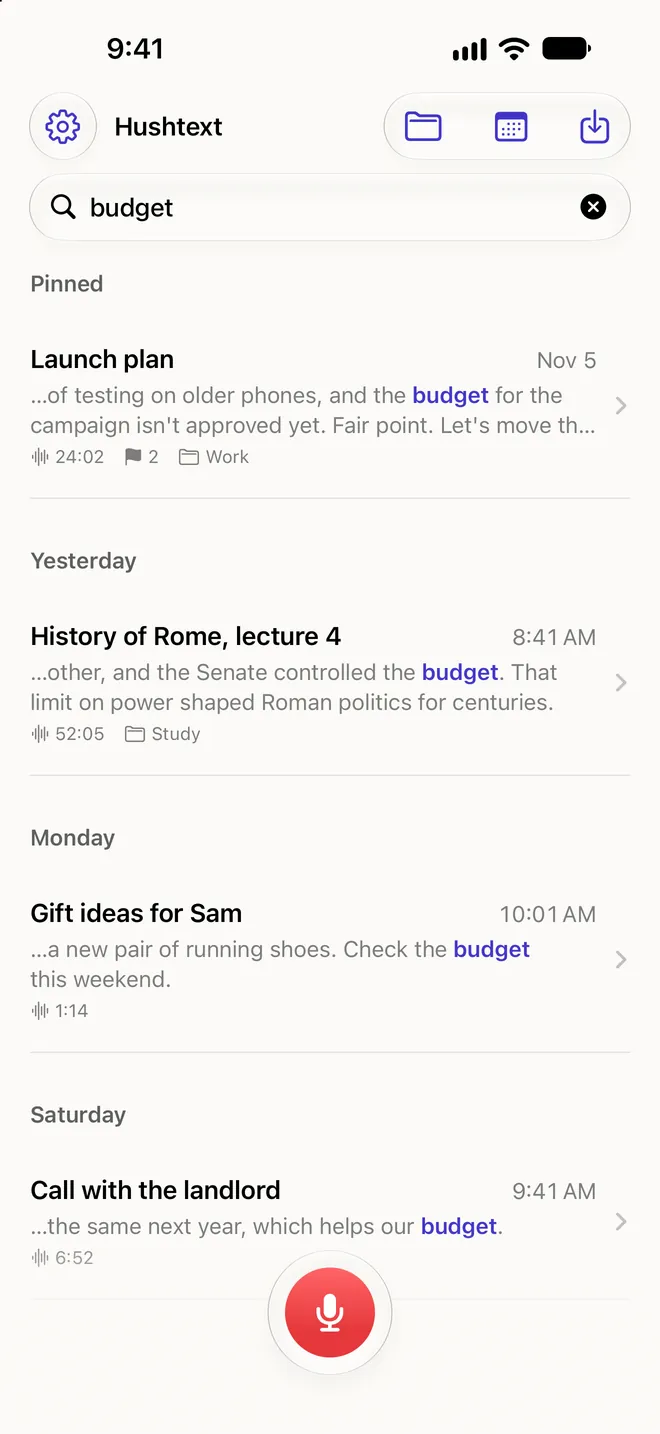
There's more on finding things in how to search voice recordings.
Journaling in more than one language
Whisper covers 99 languages and detects the language at the start of each recording. If you switch languages partway through, the transcript can go wrong after the switch. Two habits fix that: keep each entry to one language, or transcribe a mixed entry again in the language you choose. If you always journal in the same language, set it as the default in Settings.
What it costs to try
Hushtext transcribes your first 3 recordings in full for free. After that, the free version transcribes the first 3 minutes of each recording, which covers a whole entry if you keep them short. Hushtext Pro transcribes entries of any length and adds summaries and to-dos, written on the iPhone by Apple Intelligence, on iPhones and in languages Apple Intelligence supports. Transcription needs iPhone 13 or later.
One last thing: a journal can help you think, but it isn't a substitute for talking to people. If you find yourself working through something heavy, share it with someone you trust or a professional too.
FAQ
What is a voice journal?
A diary you speak instead of write. You record short entries about your day, thoughts or decisions, and keep the recordings, ideally with transcripts so you can read and search them later.
Is voice journaling private?
It depends on the app. With on-device transcription, your audio and text stay on the iPhone, and nothing leaves it unless you share it.
How long should a voice journal entry be?
As long as you have. A two-minute entry most days builds a better journal than a long one now and then.
Can I keep a voice journal on Apple Watch?
Yes. The Hushtext Watch app records on your wrist and sends the recording straight to your paired iPhone, where it's transcribed. The text then shows on the Watch.