
How to Write Meeting Minutes from a Transcript (With Template)
To write meeting minutes, note the date and attendees, summarize each agenda item in a sentence or three, list every decision, and list every action item with one owner and a due date, then send them out within a day. A transcript makes this faster and more accurate: instead of writing while people talk, you take part in the meeting and pull the minutes out of the text afterward.
Good minutes are short. Someone who missed the meeting should be able to read them in a couple of minutes and know what changed and what they owe. The transcript stays behind as the detailed record.
What meeting minutes should include
- The basics: meeting name, date and time, who attended, who was absent, and who took the minutes.
- Agenda items: one short section per topic, in the order discussed.
- Key points: a sentence or three per item on what was discussed, written neutrally.
- Decisions: what was agreed, in plain words. For a formal vote, the motion and the result.
- Action items: what will be done, by whom and by when.
- Open questions: anything raised but not settled, so it doesn't quietly disappear.
- Next meeting: the date, if one was set.
Decisions, action items and discussion are different things
This is where most minutes go wrong, so it's worth being precise:
- A decision is something the group agreed that changes what happens next: "We'll launch on the 14th, not the 7th."
- An action item is a task with one owner and a deadline: "Priya sends the revised schedule to the vendor by March 12."
- Discussion is the context: the options weighed and the arguments made. In minutes it shrinks to a sentence or two.
A decision often creates action items, but they aren't the same. "We'll switch vendors" is a decision; "Marcus collects three quotes by March 13" is the action that makes it happen.
A meeting minutes template
Copy this into a note or document and fill it in.
- Meeting: name and purpose
- Date and time: date, start and end
- Attendees: names
- Absent: names
- Minutes taken by: name
1. Agenda item title
- Key points: one to three sentences on what was discussed.
- Decision: what was agreed, or "No decision; revisit next meeting."
- Open question: anything left hanging, and who will follow up.
Repeat that block for each agenda item, then collect every action item in one table at the end:
| Action | Owner | Due | Status |
|---|---|---|---|
| Send revised schedule to the vendor | Priya | Mar 12 | Open |
| Collect three quotes from new vendors | Marcus | Mar 13 | Open |
| Share the launch checklist with support | Dana | Mar 16 | Open |
Next meeting: date and time.
That single action-item table is the most useful part of the document. People skim straight to it, and the next meeting can open by going through it line by line.
From transcript to minutes in six steps
- Record the meeting and get the transcript. One phone in the middle of the table works for in-person meetings; for a video call, put it next to your laptop's speaker. Our guide to transcribing meetings without a bot covers setup and consent.
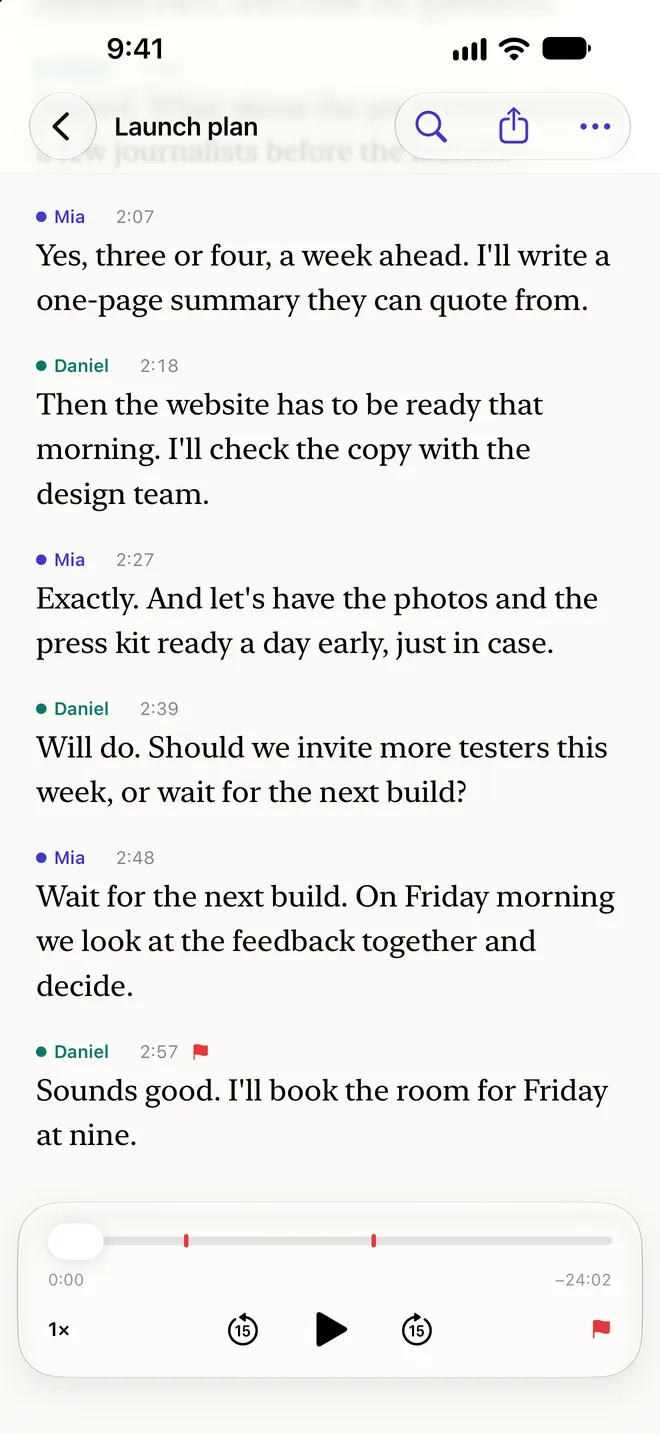
- Put names on the speakers. Speaker labels ("Speaker 1", "Speaker 2") show who said what. Rename them to the real people and your attendee list writes itself. If the labels look mixed up, see how speaker diarization works.
- Search for commitment language. Instead of rereading an hour of text, search the transcript for the phrases people use when they decide or promise something: "agreed", "decided", "let's go with", "we'll", "I'll", "can you", "by Friday", "next week", "deadline". Each hit is a candidate decision or action item.
- Listen to the moments that matter. Transcripts can mishear a number or a name. Before you write down a date, a budget or a commitment, tap the word in Hushtext to hear that exact moment. It takes seconds and saves an awkward correction later.
- Write each section in your own words. Summarize the discussion; don't paste it. Quote directly only when the exact wording matters, such as a motion or a promise made to a client.
- Send the minutes and ask for corrections. Send them within a day, while people still remember. A line like "Reply by Wednesday with any corrections" turns your notes into an agreed record.
Let an on-device summary write the first draft
With Hushtext Pro on an iPhone that supports Apple Intelligence, Apple Intelligence can write a summary and a list of to-dos from the transcript, right on the phone. Treat it as a first draft. It's a fast way to see the shape of the meeting, but check every action item against the transcript before it goes out, especially owners and dates. Our guide to summarizing recordings with Apple Intelligence covers what you need and how to get better summaries.
Tips that make minutes worth reading
- Record outcomes, not debate. "The team compared both vendors and chose the cheaper one for the pilot" is enough; nobody needs the back-and-forth.
- Stay neutral. Don't describe tone ("Sam pushed back angrily"). Attribute statements to people only when it matters, which is usually for commitments.
- Use past tense and real names. "Priya agreed to send…" reads better than "P said she'd…", and "Speaker 2" should never make it into the minutes.
- One owner per action item. "Marketing will look into it" means nobody will. Name a person, even if they'll hand the work to someone else.
- Write deadlines as dates. "Next week" is ambiguous a week from now.
- End the meeting with a recap. When the chair says "To recap: we decided X, and Sam owns Y by Friday," your minutes almost write themselves, and so does any summary.
- Keep the transcript private by default. It holds everything that was said, including offhand remarks. Share the minutes widely; share the transcript only with people who need it, and only if everyone knew the meeting was recorded.
Formal minutes for boards and committees
Boards, associations and committees often need more formal minutes: the exact wording of each motion, who proposed and seconded it, and the result of the vote. A transcript is especially valuable here, because you can find the exact words instead of reconstructing them from memory. Check your organization's bylaws for what has to be included and how long minutes must be kept.
Common mistakes
- Pasting the transcript and calling it minutes.
- Action items with no owner or no date.
- Decisions buried inside a paragraph of discussion instead of stated on their own line.
- Waiting a week to send them, so nobody remembers enough to correct anything.
- Recording what people felt instead of what the group did.
FAQ
What is the difference between meeting minutes and a transcript?
A transcript is every word that was said. Minutes are a short record of attendees, decisions, action items and key points. Use the transcript to write accurate minutes and to settle questions later.
What should not be included in meeting minutes?
Personal opinions, descriptions of tone, side conversations, long back-and-forth and anything said off the record. Keep sensitive matters, such as personnel issues, to what the record actually needs.
How soon should meeting minutes be sent?
Ideally within a day, while the meeting is fresh. The longer you wait, the harder it is for anyone to spot a mistake.
Can AI write meeting minutes?
AI can draft a summary and to-dos from a transcript, which is a useful start. A person should still check decisions, owners and dates against the recording before sending, because a summary can miss nuance or get a detail wrong.